You get in the car, plug in your phone, and CarPlay takes a few extra seconds to load. Some mornings the cable is tangled in the cup holder. Other times it’s just annoying to unplug your phone every time you hop out for a coffee run. None of this is a huge problem on its own, but it adds up, and it’s exactly why wireless CarPlay and Android Auto adapters have become such a popular upgrade for people who already have a wired system in their vehicle.
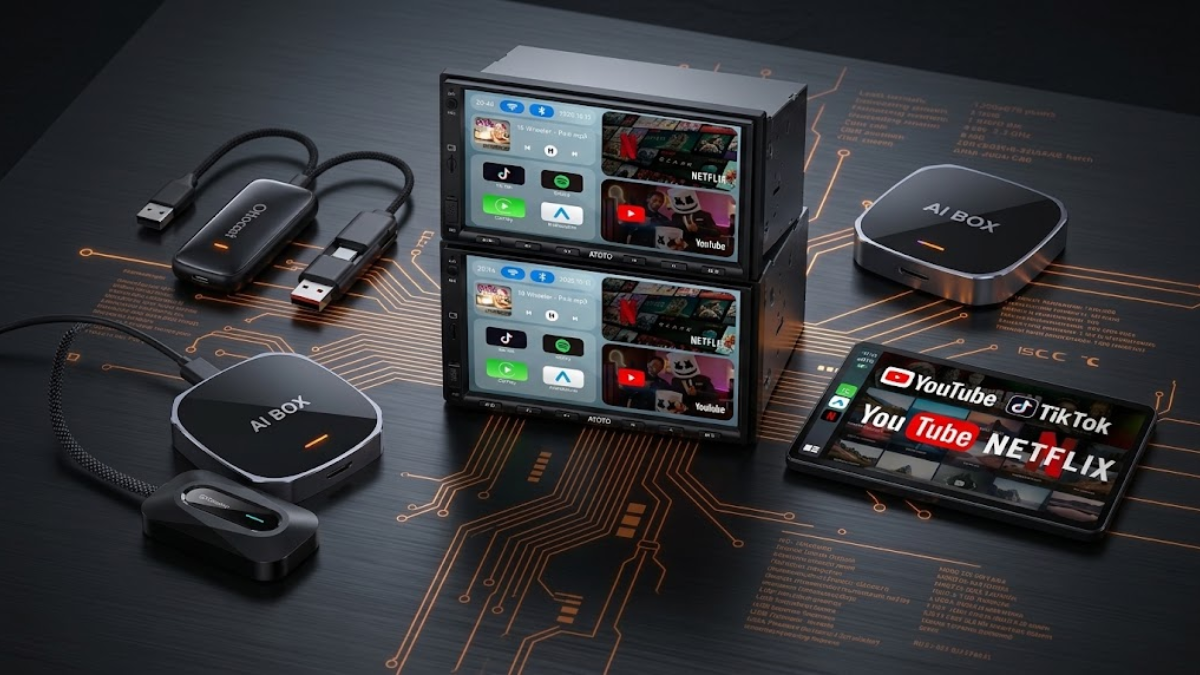
A wireless CarPlay and Android Auto adapter is a small device that plugs into your car’s existing USB port and lets your phone connect over WiFi instead of a cable. Your phone stays in your pocket or bag, the connection happens automatically once you’re paired, and the screen still shows the same CarPlay or Android Auto interface you already know. Some of these devices go a step further and function more like a small streaming computer for your dashboard, often called an AI box, which can add things like Netflix or YouTube on top of basic wireless mirroring.
Both types solve the same core problem in different ways, and the right one really depends on what you actually want from your infotainment system. This article looks at five current options, from simple plug and play adapters to more full featured AI boxes, so you can figure out which approach fits your car and your habits.
Quick Comparison
| Product | Wireless CarPlay | Wireless Android Auto | AI Box Features | Streaming Support | Notable Extras |
|---|---|---|---|---|---|
| Jutaruoo 2-in-1 | Yes | Yes | No | No | WiFi 6, Bluetooth 5.4, auto-reconnect, USB-A/C |
| Bananashark 4-in-1 | Yes | Yes | No | No | Screen mirroring, HDMI output |
| GUYOSPE 2-in-1 (2026) | Yes | Yes | Yes | Netflix, YouTube | Plug and play design |
| MYATOTO Magic AI Box | Yes | Yes | Yes | Netflix, YouTube | Dual WiFi, Bluetooth, TF card support |
| OTTOCAST Play2Video Ultra | Yes | Yes | Yes | Built-in Netflix, YouTube | Android 12 system |
How to Choose a Wireless CarPlay and Android Auto Adapter
Before comparing individual products, it helps to understand what actually determines whether one of these adapters will work well in your car.
Your car needs factory wired CarPlay or Android Auto already. This is the single most important requirement, and it trips up more buyers than anything else. These adapters do not add CarPlay or Android Auto to a vehicle that doesn’t already support it. They convert an existing wired connection into a wireless one. If your factory head unit doesn’t offer wired CarPlay or Android Auto at all, none of these five products will help.
Phone compatibility matters on both platforms. iPhone users need a version of iOS that supports wireless CarPlay, and Android users need a version of Android that supports wireless Android Auto. Older phones sometimes lack the wireless protocols even if the car itself is capable.
Connection stability is where cheaper adapters tend to disappoint. A dropped connection at a red light or a laggy reconnection every time you start the car defeats the purpose of going wireless in the first place. Features like automatic reconnection and modern WiFi standards exist specifically to reduce this kind of daily friction.
USB connector type is easy to overlook. Some vehicles have USB-A ports, others have USB-C, and a mismatch means you’re dealing with adapters and dongles before you’ve even solved the original problem.
Decide honestly whether you want an AI box or a simple adapter. A basic wireless adapter does one job: it removes the cable. An AI box runs its own operating system and can stream apps like Netflix or YouTube directly on your car’s screen, sometimes even while the vehicle isn’t in motion. That’s genuinely useful for passengers on long trips or for anyone who parks and waits often, but it’s also unnecessary complexity if all you wanted was wireless CarPlay for your daily commute. If you’re already thinking about how your phone integrates with your dashboard, it’s worth checking out our guide to best car phone mounts for everyday driving as a complementary upgrade, since a stable mount matters just as much as a stable wireless connection.
Jutaruoo 2-in-1 Wireless CarPlay & Android Auto Adapter

The Jutaruoo adapter is a good example of the category doing exactly what it promises and nothing more. It’s built for cars that already have factory wired CarPlay or Android Auto, and its entire job is to take that wired signal and broadcast it wirelessly using WiFi 6 and Bluetooth 5.4.
What stands out here is the auto-reconnect behavior. Once you’ve paired your phone the first time, the adapter is designed to reconnect automatically each time you start the car, which matters more than it sounds like it should. Most people don’t want to fumble with settings every single morning, they just want to start the car and have CarPlay appear.
The inclusion of both USB-A and USB-C compatibility is a practical touch, since it means the adapter isn’t locked to one connector style, which can be a headache in older or newer vehicles with different port types.
This isn’t an entertainment device and it doesn’t try to be. It’s a focused wireless upgrade for someone who is happy with their current CarPlay or Android Auto experience and simply wants the cable gone.
Pros
- Supports both wireless CarPlay and wireless Android Auto
- Modern WiFi 6 and Bluetooth 5.4 for a more stable connection
- Automatic reconnection reduces daily setup friction
- Compatible with both USB-A and USB-C ports
Cons
- No AI box or streaming functionality for those who want extra features
- Still requires a factory wired CarPlay or Android Auto system to function
- Simplicity means it won’t appeal to buyers looking for entertainment extras
Bananashark 4-in-1 Wireless CarPlay & Android Auto Adapter

The Bananashark adapter takes the same basic wireless concept and adds a couple of extra capabilities that push it into more flexible territory. It’s designed as a 4-in-1 device, offering wireless CarPlay and Android Auto along with screen mirroring and HDMI output.
The HDMI output is the detail worth paying attention to, since it opens up use cases beyond the factory infotainment screen. Screen mirroring in general can be handy in vehicles where you want more flexibility in how content from your phone reaches a display, though the practical value depends heavily on what kind of screen setup you’re working with.
Plug and play installation is another point in its favor for people who don’t want to dig into settings menus. You connect it to your OEM wired port and it’s meant to get to work without a complicated setup process.
Like the Jutaruoo, this adapter depends entirely on your car already having a working wired CarPlay or Android Auto system. The 4-in-1 label refers to functionality bundled into one device, not compatibility with vehicles that lack wired support in the first place.
Pros
- Wireless CarPlay and Android Auto in one plug and play device
- HDMI output adds flexibility beyond the standard dashboard screen
- Screen mirroring gives more options for how content is displayed
- Straightforward installation for OEM wired systems
Cons
- HDMI and mirroring features are only useful if your setup can take advantage of them
- No AI box functionality for streaming apps
- Requires an existing OEM wired CarPlay or Android Auto connection
GUYOSPE 2-in-1 Wireless Apple CarPlay & Android Auto Adapter 2026

This is where the lineup shifts from simple adapters into AI box territory. The GUYOSPE unit is marketed as a Magic AI Box, and the distinction matters. Instead of just relaying a wireless signal, an AI box like this one is built to support streaming apps such as Netflix and YouTube directly through the car’s screen, which is a different kind of functionality than a basic wireless relay offers.
In practical terms, this means the device isn’t only carrying your phone’s CarPlay or Android Auto signal wirelessly, it also offers app support of its own. That’s a meaningful difference from something like the Jutaruoo or Bananashark, which only exist to carry your phone’s signal.
The plug and play design keeps installation simple despite the added functionality, which is a reasonable trade off for anyone who wants entertainment features without a complicated setup process.
The listing is explicit that this adapter only fits cars with existing wired CarPlay or Android Auto, which is worth repeating here because AI boxes are sometimes mistaken for devices that add CarPlay to vehicles that never had it. That is not how this technology works.
Pros
- Functions as an AI box with Netflix and YouTube support, not just a basic wireless relay
- Plug and play setup despite added functionality
- Wireless support for both Apple CarPlay and Android Auto
Cons
- Only compatible with vehicles that already have wired CarPlay or Android Auto
- Streaming features add complexity that some buyers may not need
- More capability generally means more that can go wrong compared to a simple adapter
MYATOTO Magic AI Box

The MYATOTO Magic AI Box leans further into the idea of the adapter as a small connected hub rather than a simple pass-through device. Alongside wireless CarPlay and Android Auto, it includes dual WiFi and Bluetooth, and it’s described as functioning as an IoT hub, which points toward a broader set of connected features than a basic adapter offers.
The addition of TF card support is a notable difference from the other AI boxes in this list. That kind of local storage option can matter for anyone who wants to keep media accessible without relying entirely on a live internet connection, which is a genuinely different use case from streaming Netflix or YouTube on demand.
Dual WiFi is worth noting as a feature, though the exact reasoning behind the manufacturer’s design choice isn’t something we can confirm. What matters practically is that the device is equipped with two WiFi radios, which is listed as part of its connectivity setup.
This is a device built for someone who wants their car’s screen to do more than just mirror a phone, whether that’s occasional streaming, more flexible connectivity, or media stored locally on a card. It’s not the right fit for someone who only wants a clean, minimal wireless CarPlay experience.
Pros
- Combines wireless CarPlay and Android Auto with broader AI box functionality
- Dual WiFi setup as part of its connectivity features
- TF card support allows for local media beyond streaming apps
- Netflix and YouTube support add entertainment value for passengers
Cons
- More features mean a steeper learning curve than a simple adapter
- Streaming quality still depends on your internet connection in the vehicle
- Not necessary for drivers who only want basic wireless mirroring
OTTOCAST 2026 Play2Video Ultra Magic AI Box

OTTOCAST’s Play2Video Ultra rounds out the AI box category with a slightly different emphasis. It’s described as a 3-in-1 device with built-in Netflix and YouTube, and it runs on an Android 12 system, which is a more specific detail than the general “AI box” language used for some competitors.
Running on Android 12 means the device has a defined software foundation, which can translate into a more familiar app experience for anyone who has used an Android device or Android-based streaming box before. Built-in Netflix and YouTube support means these apps are meant to work out of the box rather than requiring extra sideloading or workarounds, which is a real convenience if streaming is a priority for you.
The combination of wireless CarPlay and Android Auto with a dedicated Android operating system positions this device as one for buyers who see their car’s screen as a genuine entertainment hub, not just a mirror of their phone. That’s especially relevant for families on long drives where passengers want something to watch independent of whatever the driver is doing with navigation or calls.
As with the other AI boxes here, this only works in vehicles that already support wired CarPlay or Android Auto, and the underlying wireless mirroring functionality is fundamentally similar to the other options even though the entertainment layer is more built out.
Pros
- Built-in Netflix and YouTube reduce setup friction for streaming
- Android 12 system provides a defined software foundation
- Combines wireless CarPlay and Android Auto with genuine entertainment functionality
- Well suited to vehicles where passengers use the screen for more than navigation
Cons
- Still requires an existing wired CarPlay or Android Auto system in the vehicle
- Entertainment features add little value for drivers who only want basic wireless mirroring
- More software running on the device means more potential for updates or quirks over time
Common Mistakes to Avoid
Buying based on the adapter alone without checking your car first. The most common and most frustrating mistake is purchasing one of these devices without confirming that your vehicle already has factory wired CarPlay or Android Auto. If you’re unsure, check your owner’s manual or look up your specific trim level, since wired support sometimes varies even within the same model year.
Assuming an AI box will feel simpler than it is. These devices add real functionality, but that functionality comes with its own settings, updates, and occasional troubleshooting. If you’ve never dealt with a small Android based device before, there’s a learning curve that a basic wireless adapter doesn’t have.
Paying extra for streaming features you won’t actually use. If your daily use case is simply commuting alone with navigation and music, an AI box’s Netflix and YouTube support isn’t adding value, it’s adding cost and complexity. Save that upgrade for situations where passengers will genuinely benefit, like family road trips.
Overlooking your USB connector type. It’s easy to order an adapter and discover the port style doesn’t match your vehicle cleanly. Confirm whether your car uses USB-A or USB-C before buying, especially if you’re choosing a device that only supports one type.
Expecting identical performance across every vehicle. Head unit software, cabin WiFi interference, and even how your car’s antenna is positioned can all affect wireless performance. A device that works flawlessly in one car may behave slightly differently in another, even from the same manufacturer.
Treating wireless as a fix for unrelated infotainment problems. If your car’s factory system has other quirks, like slow app loading or an unresponsive touchscreen, a wireless adapter won’t resolve those issues since it’s only changing how the phone connects, not how the head unit itself performs.
Final Verdict
None of these five products is objectively the best choice, because they’re solving slightly different problems. The Jutaruoo and Bananashark adapters are the right call for drivers who are happy with their current CarPlay or Android Auto experience and simply want to remove the cable. Between the two, the Jutaruoo’s focus on connection stability through WiFi 6 and auto-reconnect suits someone who prioritizes a dependable daily connection, while the Bananashark’s HDMI output and screen mirroring give more flexibility to drivers who want options beyond the stock display.
The GUYOSPE, MYATOTO, and OTTOCAST devices make more sense for drivers and families who see the car’s screen as more than a mirror of their phone. The GUYOSPE is a reasonable entry point into AI box functionality without overcomplicating installation. The MYATOTO’s dual WiFi setup and TF card support suit someone who wants flexible connectivity and local media options alongside streaming. The OTTOCAST, with its Android 12 foundation and built-in streaming apps, may appeal to buyers who place greater emphasis on built-in entertainment and streaming features.
The right choice ultimately comes down to whether you want your car’s screen to do exactly what it already does, just without a cable, or whether you want it to do more.
FAQ
Do these adapters add CarPlay or Android Auto to a car that doesn’t already have it?
No. These devices convert an existing factory wired CarPlay or Android Auto connection into a wireless one. If your vehicle doesn’t support wired CarPlay or Android Auto at all, none of these adapters will change that.
Is wireless CarPlay noticeably different from wired CarPlay in daily use?
The interface itself looks and functions the same either way. The main difference is convenience, since you’re not plugging in a cable each time you get in the car, though connection quality can vary slightly depending on the adapter and your vehicle’s WiFi environment.
What’s the real difference between a wireless adapter and an AI box?
A basic wireless adapter only relays your phone’s CarPlay or Android Auto signal without a cable. An AI box runs its own operating system on top of that wireless connection, which is what allows it to support independent apps like Netflix or YouTube directly on the car’s screen.
Can I use streaming apps like Netflix while driving?
Streaming apps built into AI boxes are generally intended for passenger use or for times when the vehicle is parked, and many of these systems are designed with restrictions around driving to keep the driver focused on the road.
Will installation require any special tools or professional help?
Most of these adapters are designed to be plug and play, connecting directly to your car’s existing USB port used for wired CarPlay or Android Auto. That said, pairing your phone correctly the first time is important, and checking your specific vehicle’s compatibility beforehand can save you from returning a product that was never going to work with your setup.